
Every client told, through the right channel
Email for everything, SMS for what cannot wait.
In short
- Twenty-six events — account, booking, lesson, waiting list, payment, waiver — and for each one the school decides who is told: the client, the team, the instructor.
- SMS is an option: it covers a booking confirmation, a lesson moved or cancelled, the lesson reminder and a spot freed on the waiting list.
- The reminder goes out the day before each lesson, or once a week for the next seven days — one setting for email, another for SMS.
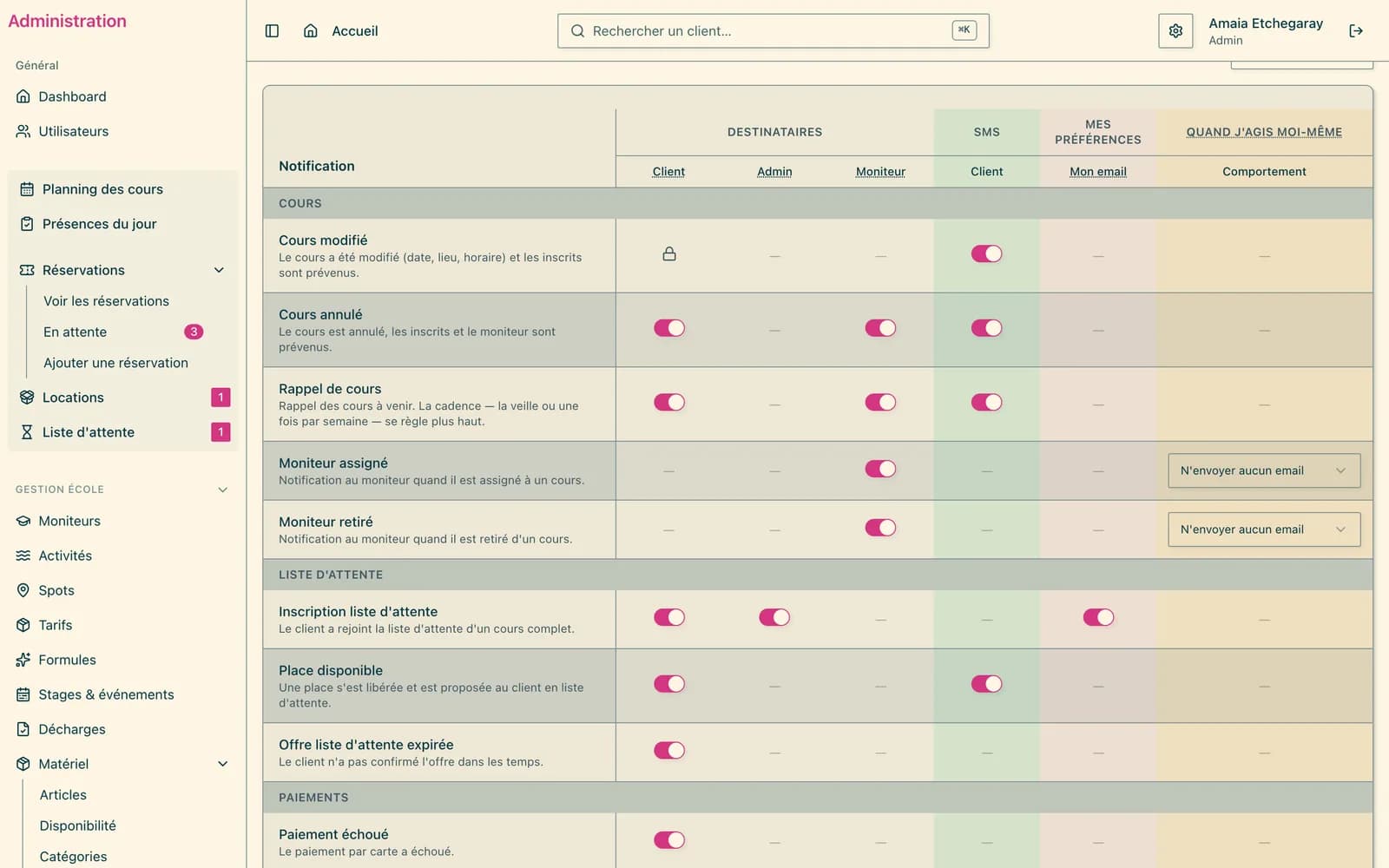
One table, not hidden settings
Notifications are set in a single table: one row per event, one column per recipient and per channel. Legal and security emails — password reset, sign-in code — are locked: they always go out.
The school also chooses which administrators receive team emails, and what happens when an admin performs the action themselves: notify as usual, or send nothing.
SMS, where it helps
A lesson cancelled because of the weather, a spot freed for a few hours: these are the messages a client must read in time. When the admin edits, moves or cancels a lesson, they tick “Notify by email” and, if they wish, “Notify by SMS” — the box says how many messages will be sent.
- The school's name as the sender
- Landline numbers set aside before sending: no credit wasted
- Every SMS logged, including those not sent, with the reason
- The credit balance on the dashboard, with a warning before it runs out
- Clients can refuse SMS from their profile
The day before, or once a week
A reminder the day before suits a client who comes once. For a client booked on five lessons, the weekly summary sends one message instead of five, on the day and at the time the school chooses. By SMS, that is as many credits saved.
At a glance
- Events
- 26, in six families
- Channels
- email included; SMS as an option
- SMS option
- €5/month, SMS Vert Pro credits on top
Frequently asked
How much does the SMS option cost?
€5 per month on top of the subscription. The text messages themselves are bought from SMS Vert Pro, on the school's own account: that is the cost to plan for on top, depending on the volume sent. Credits do not expire, which suits a seasonal business.
Can an email that is not needed be switched off?
Yes, event by event and recipient by recipient. Only legal and security emails always stay on.
Can a client refuse SMS?
Yes, from their profile. Numbers on the provider's STOP list are also excluded from sending.
See also
Want to see it for real?
Your school is ready within 24 business hours.
Create my schoolTry it for 30 days · money-back guaranteeCancel within 30 days and your first payment is refunded in full. After that, a 6-month commitment at the launch price.